Earlier this week, we started to look at the inside of computers. This is the first time I have done this, and I found it very very interesting. The number of different things in the computer is crazy to me, I knew they were super complicated and I have no idea how they all work. I hope to figure out more about all of them during this unit. Well here are some of the different parts I found yesterday and kinda understand how they work.
Motherboard
The motherboard is a printed circuit board and foundation of a computer. It is also the biggest board in the computer. It allows for power and communication between the CPU, RAM, and all other computer hardware components. The motherboard has a lot of different items on it, it has a lot of small little things that I have no idea how they work. It is located inside the computer, and it is the place where most things connect inside the computer.

Power Supply
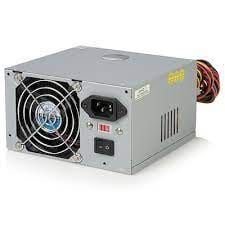
The power supply, also known as a power supply unit, is a hardware component of a computer that supplies all the other components with power. It converts 110-115 or 220-230 volts into AC which then converts it to DC. The power supply is located in the back of the computer, and usually at the top. However, in more recent tower computer cases they house all the power at the back now in the bottom of the case. In the back of the supply, you will find,
- A connection for the power cord to the computer
- A fan opening to heat out of the power supply
- A red switch to change the power supply voltage
- A rocker switch to turn the power supply on and off
Hard Drive
The hard drive, also called a hard disk drive, is a magnetic storage medium for a computer. It is a device that consists of several hard disks, drive motor to spin the disks, all sealed in a metal case to protect the disks from dust. The hard drive stores all your data, and it is where all of your files and folders are physically located. A normal size hard drive is only slightly larger than your hand but can hold over 100 GB of data. It is a very important part of the computer, and of course, you couldn’t have a computer without one.

Random Access Memory
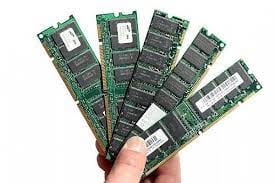
Random-access memory, also known as RAM, is a form of computer memory that can be read and changed in any order, typically used to store working data and machine code. RAM is the main memory in the computer. It is way faster to read and write from than other types of storage, such as hard disk drive, solid-state drive, or optical drive. RAM is volatile, this basically means the data obtained in the RAM is kept and saved while the computer is on, but when it turns off it is lost. When the computer is rebooted, the OS and other files are reloaded into RAM, usually from an HDD or SSD.
Central Processing Unit
Central Processing Unit (CPU) is the principal part of any digital computer system. It processes all instructions received by software running on the PC and by other hardware components and acts as a powerful calculator. The CPU is placed into a specific section of the motherboard by inserting its metallic connectors or pins found on the underside. Each separate socket is built with a specific pin layout to support only a specific type of processor.

Heat Sink
The heat sink is a very common item in computers today, some might even have multiple. A heatsink is a small metal component that’s designed to absorb heat from an adjacent or underlying component. They work by absorbing heat from the CPU or GPU which are attached. Most heatsinks consist of fins resembling that of a radiator. As the CPU or GPU warms up, heat will transfer to these fins where it’s released using a fan. Heat sinks are definitely a necessity if you want a smooth and safe running computer.

Capacitor
Capacitors are in some ways like a battery. Even though they work in completely different ways, but they both store electric energy. If you know about battery’s you know they are kinda complicated. Capacitors are much simpler than battery’s, as they can’t produce new electrons — it only stores them. A capacitor is so-called because it has the “capacity” to store energy. Capacitors are very useful in computers because they send electric current very quickly, which helps the computer run very fast.

Resistor
The resistor is a passive electrical component that creates resistance in the flow of electric current. In almost all electrical networks and electronic circuits, resistors can be found. Resistors are used for many different things. A few examples include limiting electric current, voltage division, and heat generation. Resistors are often made out of chunks of carbon or thin films of carbon or other resistive materials. They are very small inside of a computer and were very difficult for me to find the first time.

Integrated Circuit Chip
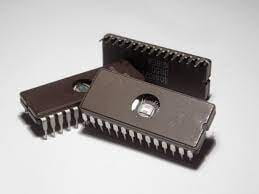
An integrated circuit (IC), sometimes called a chip, microchip, or microelectronic circuit is a semiconductor wafer. It has a ton of uses like an amplifier, oscillator, or timer. An IC is the fundamental building block of all modern electronic devices. A single IC could contain thousands or millions of transistors, resistors, capacitors, and diodes. Integrated Circuit Chip is very important to the computer.
Transistor
A transistor is really simple—and really complex. It is a miniature electronic component that can do two different jobs. When it works as an amplifier, it takes in a tiny electric current at one end and produces a much bigger electric current at the other. In other words, it’s a kind of current booster. Transistors can also work as switches. A tiny electric current flowing through one part of a transistor can make a much bigger current flow through another part of it. Transistors are made from silicon, which is a chemical element found in sand.
